
# Period End Processes
# Running of PMA
From the Main Menu click on Members Register.
Then Click on Financial Years Register.
On the Screen that loads, select the financial year you wish to run balances for.
Click on the button Jump To and select Monthly Periods from the drop down.
Select the Monthly period you wish to run balances for.
Click on Period End Processes then on Income Allocation Using Interest Rate from the drop down.
Click on Batch Run from the drop down then on Scheme Level.
On the window that pops up, select the interest rate to use either Declared or Provisional.
Finally click on Run Balances
# Accrued Pension
From the Main Menu click on Members Register.
Then Click on Financial Years Register.
On the Screen that loads, select the financial year you wish to run balances for.
Click on the button Jump To and select Monthly Periods from the drop down.
Select the Monthly period you wish to run balances for.
Click on Period End Processes then on Defined Benefits Pension Accrual from the drop down.
On the window that pops up, click on Run Pension Accrual (All Members in Scheme)
Once the two processes have completed successfully, use these additional steps to confirm the values computed by the system.
Open the "Member Register"
On the register that opens "Sponsor Register". Shows the list of employers in the scheme and members can be viewed by Double Clicking on the Sponsor.
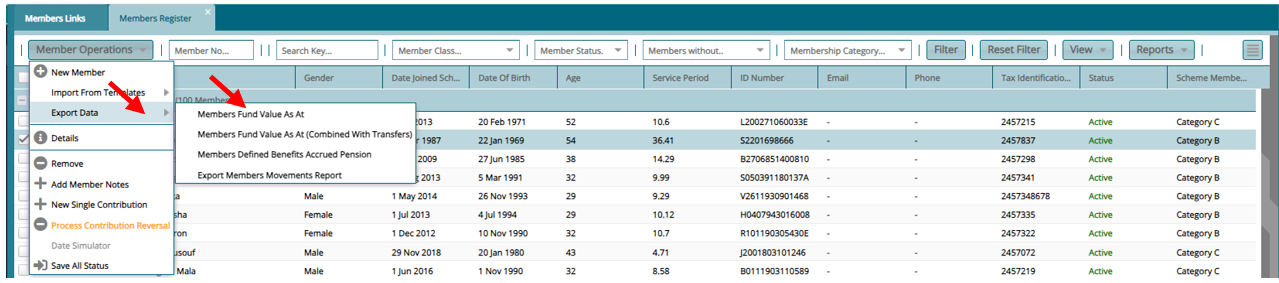
Click on Member operations then on Export Data (Members Fund Value As At, Members Fund Value As At (Combined With Transfers), Members Defined Benefits Accrued Pension)
Close Month
From the Main Menu click on Members Register.
Then Click on Financial Years Register.
On the Screen that loads, select the financial year you wish to run balances for.
Click on the button Jump To and select Monthly Periods from the drop down.
Select the month for which you want to close.
Click on Close Period button
Click on This Scheme option from the drop down.
Select the appropriate option that applies for that month
Permanently Close
Soft Close
Close